Projects


-
The Joy of Leetcode
“This is what happens if you do very well on coding puzzles,” an acquaintance texted me last year during Advent of Code. I honestly assumed the link included in the text was gonna go to some meme of a skeleton dead in front of their computer.

But nah, he wanted to link me to a Youtube video touting some Leetcode genius who had solved more than 3,000 problems on the site and landed a job at Google. And of course, getting a new job is why most people do Leetcode. As long as technical screens exist (which might not be that much longer, thanks ChatGPT), there will be people trying to prep for them on leetcode and leetcode-like sites.
That said, I have been doing a little leetcode here and there, despite not being on the job market. That sounds a little crazy to say out loud. Why would anyone want to put themselves through this torture?
Women and Gender eXpansive Coders DC has a monthly “Craft n’ Crush Your Coding Interview” event where a few folks get together and solve these toy problems in a supportive environment.
The organizer, Melissa, structures the events so that everyone has 15 minutes to solve the same problem, then we spend 15 minutes discussing our approaches and solutions, and then take a 15-minute crafting/chat break. It’s a really supportive environment. And there’s yarn.
Honestly, for some people the promise of crafts might be enough to get them to come. I’ve really been looking forward to the coding parts, though.
-
The fundamental problems and data structures in a Leetcode easy (the organizer mostly chooses easies) are often things I know about but don’t necessarily work with on a day-to-day basis. Can’t remember the last time I worked with a linked list outside of a Leetcode problem, but it’s probably a good thing to remember that such a structure exists.
-
Since everyone coming to this meetup has different skills and backgrounds, there are as many different solutions as there are people. I’ve often felt pretty proud of a solution of mine until another person comes along with an even better optimization. These are fantastic learning opportunities! Also, everyone uses their language of choice so I often get to go “Oh, Ruby can do that?”
-
I’m also not ashamed to admit I’m a tad bit competitive, so this meetup scratches that itch for me.
-
Plus, I’m making progress on a very cool cowl.
If you’re a woman in tech in the DMV, I hope you’ll check out WGXC DC’s Craft-n-Crush series. And if you’re not in the area, perhaps you would be inspired to start your own Craft n Crush in your region?
-
-
Save Time With Postman's Pre-Request Scripts
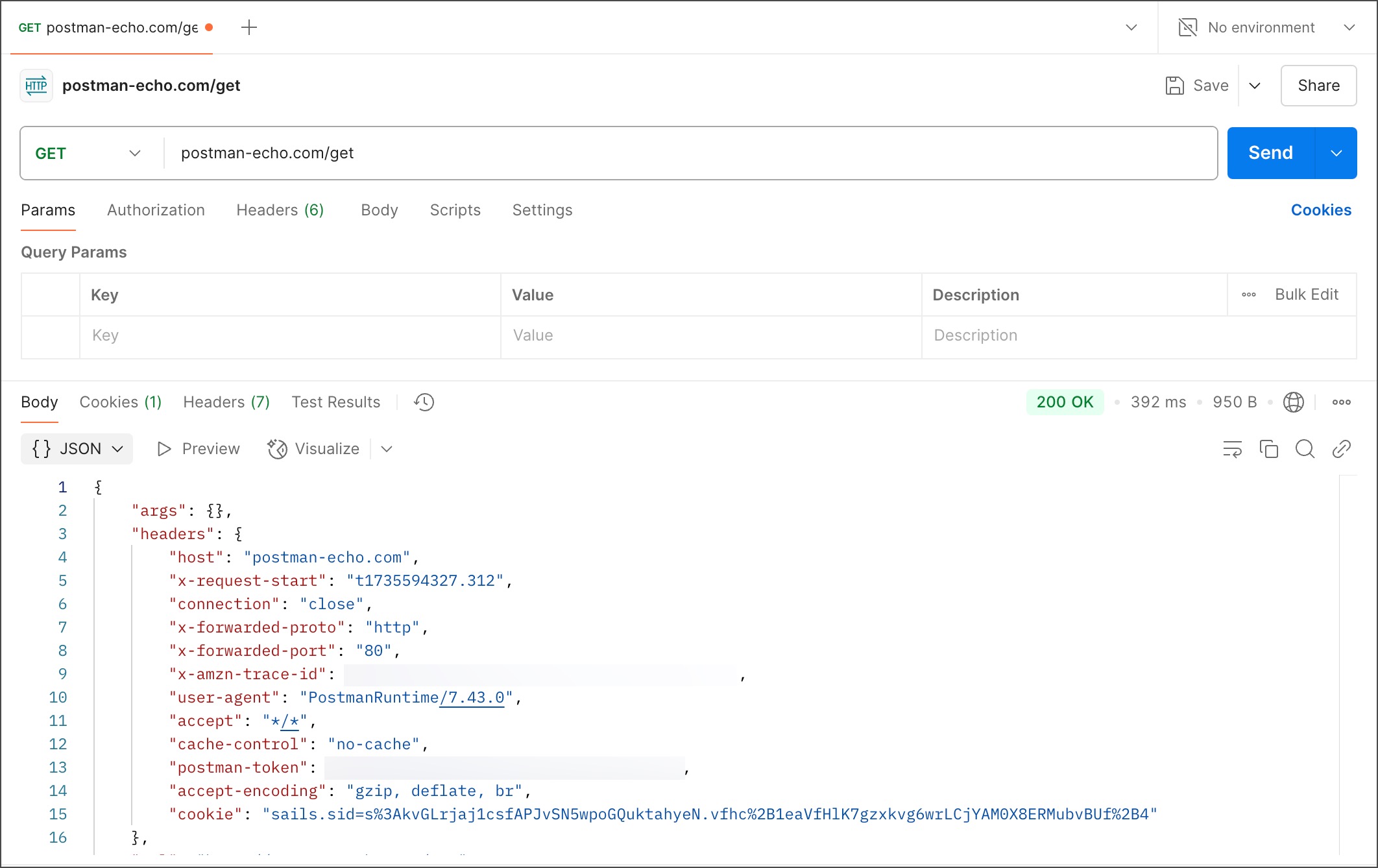
Postman is an incredibly powerful tool for prototyping and testing APIs. If you ever find yourself making any kind of API request to any service (regardless whether it’s one you built or one you use), I really think you should be using Postman.
In this post I’m going to share how to use pre-request scripts to make Postman even more powerful.
One common pattern in many web APIs is exchanging an API key for a token. In short:
A developer generates an API key once. Then, using that key (and possibly other secret credentials), they can call a token endpoint, which reads the key and returns a short-lived bearer token. The bearer token usually expires after a short time, such as an hour, at which point the token must be refreshed.
As an example, take a look at the docs for Shopify’s API:
Step 1: Ensure you have a valid session token. Your app’s frontend must acquire a session token…
Step 2: Get an access token. If your app doesn’t have a valid access token, then it can exchange its session token for an access token using token exchange.
In this scenario, a developer makes a POST request to
https://{shop}.myshopify.com/admin/oauth/access_tokenwith her app’s API key and a few other secret parameters, and receives back this response:{ "access_token": "f85632530bf277ec9ac6f649fc327f17", "scope": "write_orders,read_customers", "expires_in": 86399, "associated_user_scope": "write_orders", "associated_user": { "id": 902541635, "first_name": "John", "last_name": "Smith", "email": "[email protected]", "email_verified": true, "account_owner": true, "locale": "en", "collaborator": false } }She now has an access token with two scopes that expires in 86399 seconds, or just under one (normal) day.
If you’re a user of whatever this Shopify app is meant to do, all this happens invisibly, under the hood. But if you’re a developer testing against the Shopify API, you probably have to do this token exchange daily, manually. First make a POST request to the token endpoint, then retrieve the result, then paste the token into the API call you actually want to make.
And many services provide tokens with much shorter expirations – an hour or even a few minutes.
You could save a separate request in Postman and remember to hit the token endpoint before you make a new request, or you could use a pre-request script to chain the two calls together. Here’s how it’s done.
-
Some Tips for Working With the Google Sheets Java SDK
At work, I’ve been working on a project that involves reading and writing data to and from a Google sheet. One could argue about the wisdom of using Google Sheets to hold any data, but for the sake of this post (and my sanity) let’s assume that the business requirements to use Google Sheet are watertight.
So I have to be able to talk to Google Sheets through my Java service, and of course Google has a Sheets SDK that we can use. Their quickstart tutorial assumes a different method of access/authorization than I expect to use, but that’s okay.
For my purposes, I needed to create a project in my company’s GCP account, and a service account that had access to that project. That gives me a set of credentials in JSON that we can store anywhere (we’re using AWS paramstore, because this is a two-cloud-provider kinda project!), but in order to access a specific sheet we also have to share that sheet with the service account. I bolded that because I’ve forgotten that step multiple times throughout the lifespan of this project.
Repeat: the service account credentials, even when scoped to SPREADSHEETS:ALL, still cannot access individual spreadsheets in your organization’s workspace unless you share the spreadsheet with them. Seems kinda cray that we have to treat the service account like a person in order to access resources, but I guess Google ended up picking a person-based model years ago and now they’re probably stuck with it.
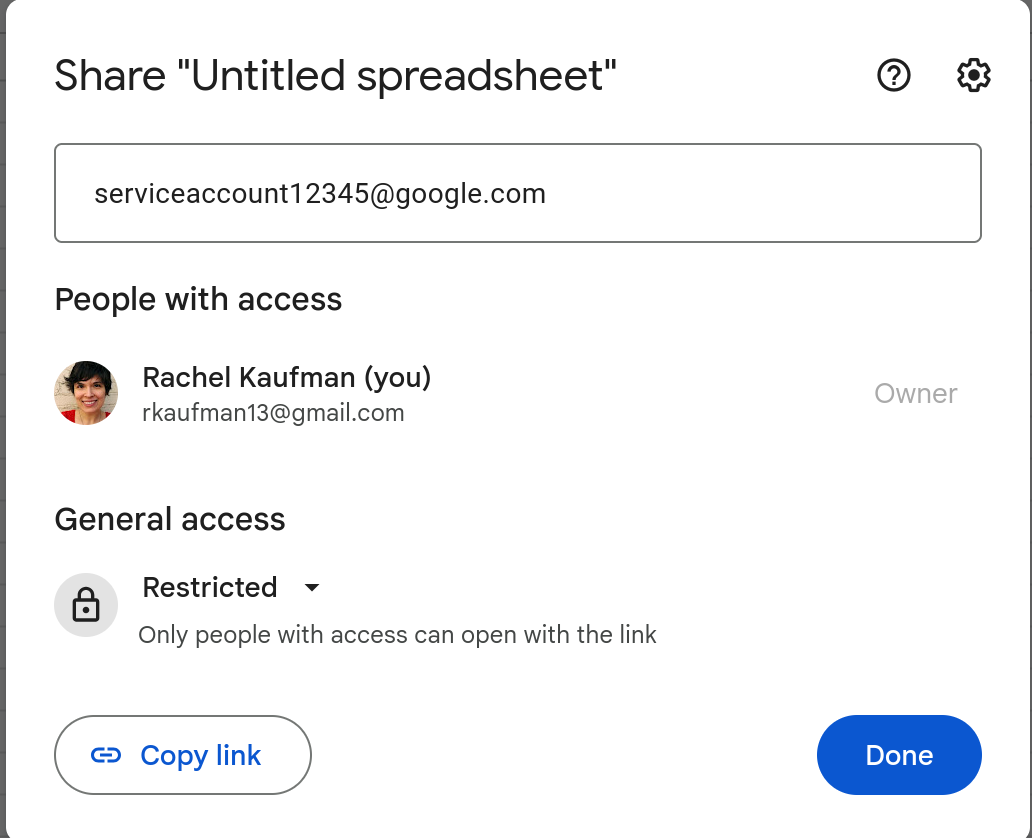 (This is not a real example.)
Once you’ve shared your sheet you can start talking to it in Java. I built credentials like this:
-
What I Learned at Work Today: Status Code Tricks
At work yesterday, I came across this snippet of code in a Java class meant to handle HTTP responses:
boolean isSuccessful(int statusCode){
    return statusCode / 100 == 2;
}
My first instinct was to chuckle (and in fact I sent it to a coworker and we both chuckled). What a silly way to test if something equals 200! I figured whoever wrote this years ago was just having a clever laugh at future coders’ expense.
Then today I sent it to another coworker, who pointed out my error, which is that most (all?) typed languages handle integer division by returning an integer.
In Javascript you can just do:
console.log(3/2);and you’ll see
1.5displayed on the screen. This is how humans do division, and it’s still how I instinctively think about numbers. But in Java (and Python2, and C, and plenty of other languages), dividing an int by an int produces another int. (This is not intuitive for a lot of people, as evidenced by the cornucopia of posts on sites like Stackoverflow.) That means in the snippet above,statusCode / 100 == 2would return true for a 200, but also a 204, a 202, or any other 2xx code.Pretty smart!
-
Cool Discovery: Over the Wire's Wargames
I was nerd sniped this weekend by a coworker who told me about Over The Wire’s wargames, which are self-directed cybersecurity challenges. I am just about halfway through the easiest one, Bandit, which in addition to having me scan for open ports and base64 decode strings, is also teaching me quite a few new command-line tricks. Here’s a little random selection:
sshpassis a fun little utility that lets you enter your ssh password in visible text on the command line. This seems like a terrible idea to use with a production server that you care about, but these games have me storing 30 separate passwords and I want to make sure I’m putting in the right one, and I’m not worried about someone hacking Over the Wire.- Have a weird binary that you don’t know what to do with?
stringswill print any human-readable set of characters that it finds. Useful for playing CTF challenges and probably other things. grep -v thingyoudontwantwill display records that DON’T match the phrase. Thevstands for invert, clearly.
Off I go to hack into the next level…